
PrunePic for iPhone
Clean up your iPhone photos with a swipe



Left to delete. Up to keep. Right to favorite. PrunePic turns a cluttered camera roll into a few minutes of swiping, and nothing is deleted until you say so.
Free on the App Store. Your photos never leave your iPhone.
One photo, one swipe, one decision
PrunePic shows your library full screen, one photo or video at a time. No selecting, no scrolling back to find your place. It remembers every decision, so you can stop whenever you like.
Swipe left to delete
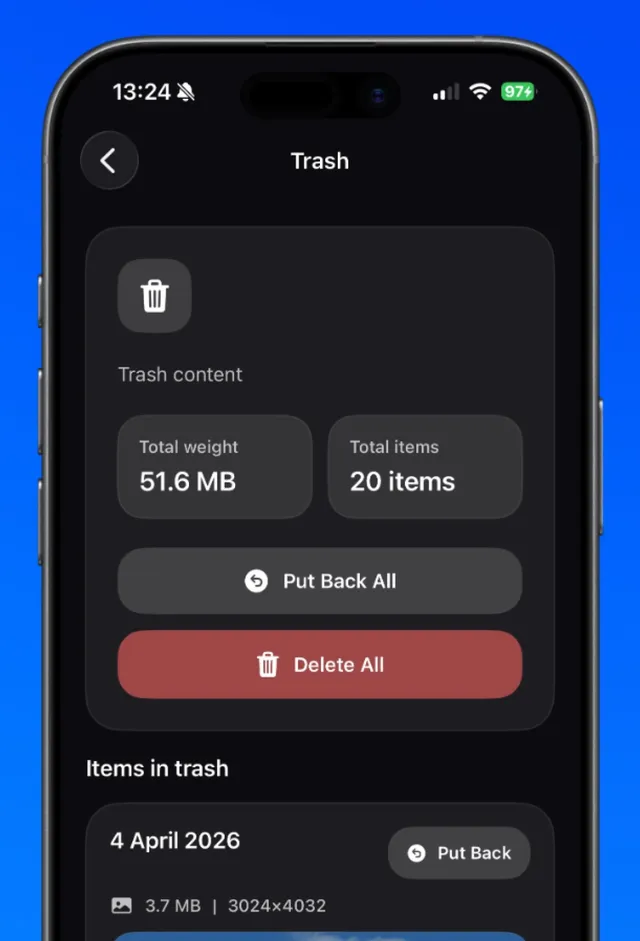
The photo goes to the PrunePic Trash, where you can check it before anything is removed.
Swipe up to keep
It stays in your library and the next photo slides in. Photos you keep never come back.
Swipe right to favorite
Drop your best shots on Favorites, or straight into one of your albums.
What your camera roll is quietly hoarding
5 GB
is all the free iCloud storage you get. A camera roll fills it with a couple of thousand photos.
Source: Apple, iCloud storage plans
170 MB
for one minute of 4K video at 30 fps. That is the space of about 70 photos.
Source: iPhone Settings › Camera › Record Video
1 of 10
You took ten shots to get the one you posted. The other nine are probably still in your library.
30 days
Deleted photos wait in Recently Deleted before they are really gone, and keep using storage until then.
Source: Apple, Photos on iPhone
Still there
The boarding pass from two trips ago, the parking spot from last spring, the meme you sent once.
iCloud+
If you pay for more iCloud storage, part of that plan may be holding screenshots you will never open again.
5 min
a day is enough. At a photo every couple of seconds, that is thousands of photos cleared in a month.
Nothing is gone until you are sure
Swiping is fast because no single swipe is final. Everything you trash waits in the PrunePic Trash, and emptying it sends photos to Recently Deleted in the Photos app for 30 more days.
- Review the trash, put one item back or restore everything.
- Undo your last keep, trash or favorite in one tap.
- iOS asks you to confirm before anything leaves your library.
Go straight to the clutter
Shuffle your whole library or focus on what takes the most space: screenshots, long videos, old photos from this day, or the trip you just got back from.
- Swipe to delete, keep or favoriteOne photo at a time. Left to delete, up to keep, right to favorite. The fastest way through a cluttered camera roll.
- A trash you empty when you are sureNothing is deleted when you swipe. Review the PrunePic Trash, put anything back, then empty it in one batch.
- Cleaning modes for every kind of clutterRandom, Everything, Photos, Screenshots, Videos, On This Day and Trips & Moments. Choose what to clean before you swipe.
- Clear out old screenshotsA feed of only screenshots. Swipe away the receipts and memes, keep the few you still need.
- Find the videos eating your storageOnly your clips and screen recordings, sorted longest first. The quickest way to free gigabytes.
- Clean up a little every day with On This DayPhotos and videos from today's date in past years. A small new batch every day.
- Clean up a trip while it is still freshPhotos grouped by where they were taken. Review a holiday or event in one sitting.
- File photos into albums as you swipePin albums to the swipe tray and drop keepers into them while you clean. No separate sorting session.
- Track your cleanup progressThe size of everything you deleted over time, a breakdown of your library by media type, and badges for milestones.
- Home Screen widgetsRecent Photos and Cleanup Progress widgets for your Home Screen.
Keepers end up where they belong
Pin your favorite albums to the swipe tray and drop photos into them while you clean. Your library gets smaller and better organized in the same session.

Your photos stay on your iPhone
PrunePic works through Apple's Photos framework on your device. Your photos and videos are never uploaded, there is no account to create, and the app works without an internet connection. The app measures how it is used, never what is in your photos. Privacy policy
Processed on your iPhone
Reviewing, sorting and filing happen on your device. There is no PrunePic server for your photos.
Works offline
Clean up on a plane or anywhere else. Your library is already on your phone.
Your history stays local
What you reviewed and the space you saved are stored on your device, never uploaded.
Free to start, Pro when you want more
PrunePic is free to download and you can start cleaning right away. Upgrade when you want to clean without a daily limit or go straight to one kind of clutter.
Free
Free download
- 10 decisions a day
- Random and Everything modes
- The PrunePic Trash and Undo
- Favorites
- Home Screen widgets
- Insights for the last 30 days
PrunePic Pro
Weekly or yearly subscription
- Unlimited decisions every day
- Photos, Screenshots and Videos modes
- On This Day and Trips & Moments modes
- Monthly, yearly and lifetime insights
How the free limit works
- Every photo you keep, trash or add to Favorites counts as one decision. The counter at the top of the feed shows how many are left.
- The count starts again at midnight, in your iPhone's time zone.
- Everything you reviewed stays saved when you reach the limit, so you continue where you stopped.
The app shows the price for your country, and any free trial, before you buy. You can cancel at any time in the Settings app.
Frequently asked questions
Does PrunePic delete photos immediately?
No. Photos you swipe left go to the PrunePic Trash first. They are only removed from your library when you empty that trash, and even then they stay in Recently Deleted in the Photos app for 30 days.
Do my photos leave my iPhone?
No. PrunePic works through Apple's Photos framework on your device and does not upload your photos or videos to any server. It even works offline.
Does PrunePic work with iCloud Photos?
Yes. PrunePic works with your Photos library whether it is stored on your iPhone or in iCloud Photos. If iCloud Photos is on, deleting a photo in PrunePic deletes it from iCloud and your other devices too.
Can I undo a swipe?
Yes. Tap Undo to reverse your last decision, swipe back to the previous card, or restore anything from the PrunePic Trash before you empty it.
Which iPhones does PrunePic work on?
PrunePic works on any iPhone running iOS 26 or later.
How much does PrunePic cost?
PrunePic is free to download, and you can start cleaning right away. A subscription unlocks unlimited cleaning every day.